Navigating the Vehicle Intake Form

Ready to sell your car, but new to the process and not sure what information you need? Maybe it’s been a few years and the terms are vaguely familiar, but where exactly you get the info is alluding you. 

In this article we take you step-by-step through the You Call We Haul vehicle intake form, explaining each item and where you can quickly find the information.

Getting Started: Mobile or Desktop?

The You Call We Haul vehicle intake form can be filled out on your mobile device, tablet, or desktop. We recommend using your mobile device – it makes uploading pictures a breeze – but any device works fine!

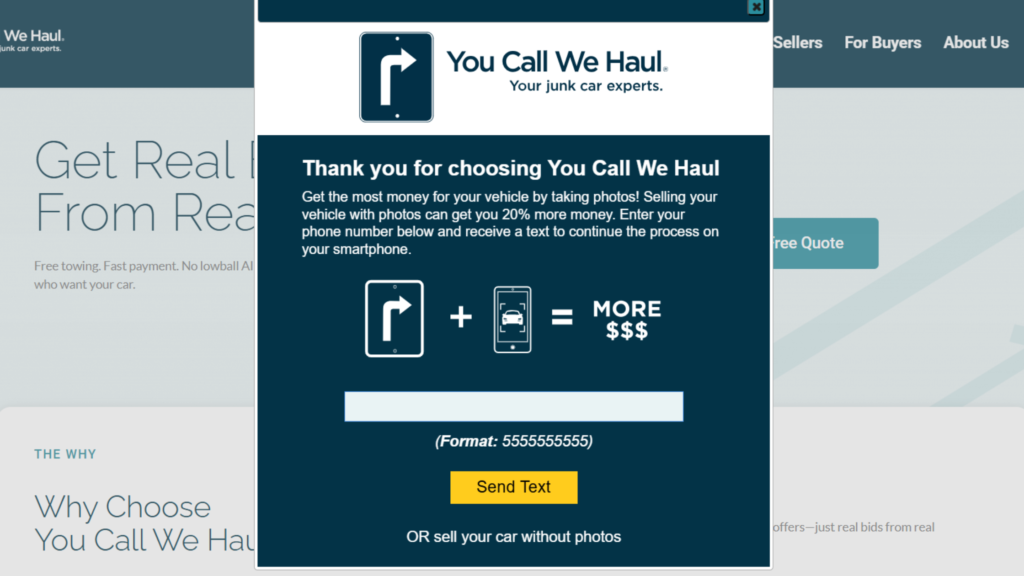
When you get started, you’ll see this pop-up form appear. If you want to upload pictures of your vehicle (which we highly recommend), enter your phone number and click “Send Text”. 

Within a few seconds you’ll receive a text with a link to continue continue the process on your mobile device.

If you’re unable to use your mobile, you can click “sell your car without photos” just below the Send Text button and it will take you to the form.

I have photos, but they’re on my desktop

If you have pictures of your car, but you want to upload them from your computer, that’s no problem! You’ll continue with the “No Photos” form, and receive an email with a link to upload them once the form has been submitted.


You Call We Haul Intake Pop-Up

Vehicle Information Fields

The first part of the form (for both mobile and desktop) consists of the vehicle information fields. All of the items needed here can be found:

  1. On the vehicle
  2. On your vehicle registration
  3. On your vehicle title


VIN

The Vehicle Identification Number (VIN) is the 16-digit number/letter combination that is unique to your vehicle. On the mobile form, you can take a picture of the VIN number (located on your driver’s side dashboard). On the desktop, you type it into the field. You can then select “Lookup VIN” and our systems will automatically fill out the Year, Make, and Model fields of your intake form.

Year / Make / Model

These are the identifiers most often used when talking about a vehicle – “I drive a 2003 Jeep Grand Cherokee.” Within that sentence, 2003 is the year; Jeep is the Make; and Grand Cherokee is the Model.

If you’re unsure about your vehicle’s information, it can easily be found on your registration or title.

Body Style / Color

On the You Call We Haul vehicle intake form, the Body Style field will populate a drop-down menu of options based on the vehicle Make / Model information that is entered. 

The easiest place to find this information is on the sticker located on the door frame when you open the driver’s door. You can also use the NHSTA VIN decoder website to get manufacturer-reported data on body style.

A drop down menu of colors will automatically populate for you. Choose the color that most closely matches your vehicle.

Mileage

This is very important information that cannot be left blank. Your mileage can be found on the odometer on your dashboard – be sure to look at your vehicle’s total mileage and not one of the Trip mileage readouts.

Condition & Title Fields

The next portion of the form consists of essential questions regarding the condition of the vehicle.

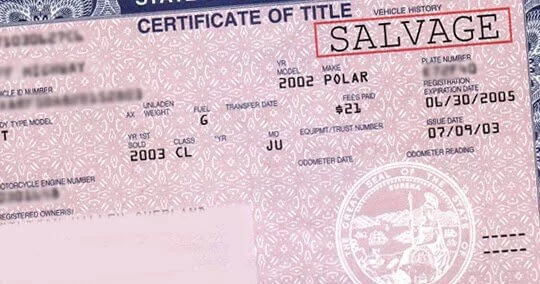
How do I know if I have a salvage title?

Salvage titles are very specific documents that are distributed by insurance companies after a vehicle is determined to be undrivable. Your title will very clearly be marked as “Salvage” or “Junk”.

Salvage Title Example
Credit: DirtLegal.com

Wheels mounted/tires inflated

Are the wheels securely attached to the vehicle so that it may be driven? Are the tires inflated or flat?

Vehicle Notes Can Help Get Better Bids

The vehicle notes section is where you can share any details about your vehicle. Most often, sellers use this to talk about the negative aspects of their vehicles – damage, broken, or missing parts. Listing the negative isn’t a bad thing. In fact, it can help speed-up bids on your vehicle.

However, you can also list positive aspects that could increase bids on your vehicle – new tires, upgrades, customizations, limited edition features, etc.

Whatever details you include, be sure to take photos of and upload as verification and visualization tools for our buyers.

Final Steps to Submit

Finally, you’ll share some contact info, click submit, and your listing is off to our buyers!

If you get stuck or aren’t sure what to put in a certain section, our team of professionals are here to help! Give us a call at 866-771-5865.

Send Me Articles Like This

* indicates required
GET REAL

Ready to Get a Real Offer?

It’s fast, free, and there’s zero obligation. Let real buyers make you a real offer today.
© Copyright 2007 - 2025 You Call We Haul. All rights reserved.Privacy Policy|Terms of Use